本記事は「Order Printer」の初期に登録されているInvoice(請求書)のテンプレートをもとに
- 初期登録のInvoice(請求書)に表示されている内容の解説
- 初期登録のInvoice(請求書)フォーマットでの日本語化
- 日本でよくある形式にしたInvoice(請求書)のテンプレート例
- 請求書に追加で入れ込みたいカスタマイズ要素
- 上記を組み合わせた最終形
- 外伝:インボイスに対応した領収書のテンプレート例
これらをまとめております
「Order Printer」の機能説明や基本設定の理解については以下の記事を参照ください
「Order Printer」のInvoice(請求書)初期登録時の表示内容
初期に登録されているInvoice(請求書)のプレビューは下記です
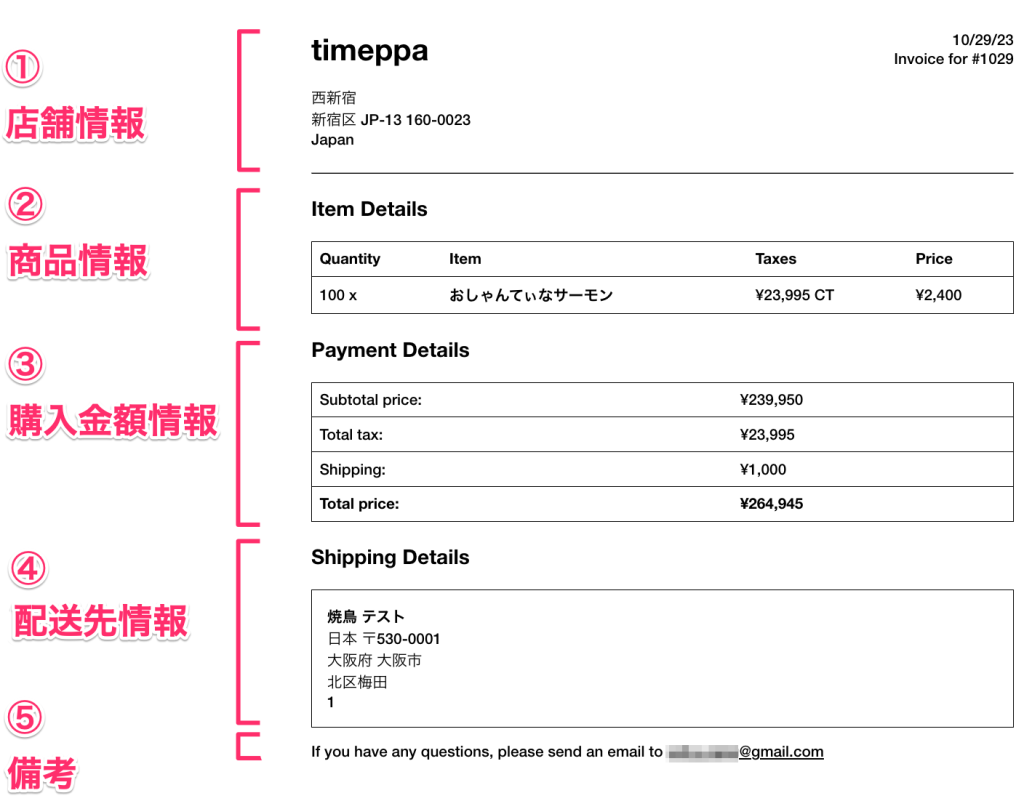
① 店舗情報:
・〈画面左〉「設定 > ストアの詳細」ページで設定したストア情報を表示
・〈画面右〉印刷しようとする日・注文番号の表示
② 商品情報(Item Details):
・購入した商品名ごとに購入点数と税額、単価の表示
③ 購入金額情報(Payment Details):
・小計や配送料、合計金額の表示
・ディスカウントの商品がある場合、ディスカウントコードを使用した場合のみその旨の表示(自動ディスカウントはしれっと小計からマイナスされて表示されるので注意が必要です・・・)
④ 配送先情報(Shipping Details):
・配送先の氏名・住所・電話番号の情報表示
⑤ コメント:
・店舗側からのメッセージなどの表示
条件によっては以下のような内容も表示されます
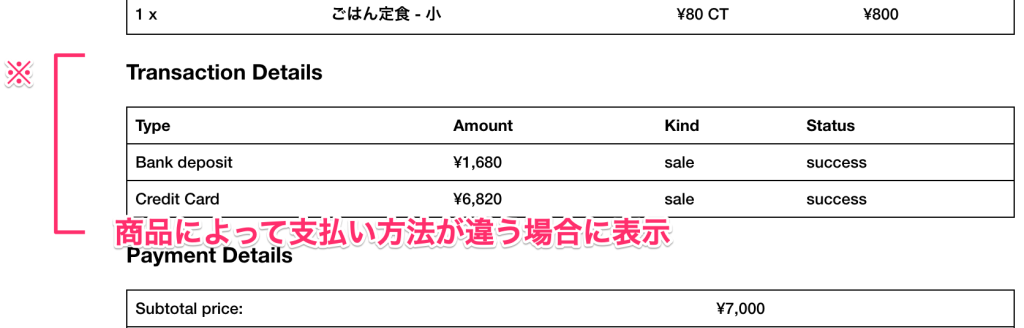
Transaction Details:
例えば商品によって支払い方法が違う場合に表示されます(確認する限りだと購入後に追加で購入する場合に支払い方法を変えて注文管理から処理した場合)

Note:
購入時にカートメモに入力がある場合に表示されます
ここで本題とはズレますが、注文管理でスタッフ間のやりとりや作業指示などはタイムラインのメモを使用しましょう
下図の場所に運用側のメモを入れてしまうと、カートメモに入力されたこととなりアプリやメールなど様々な箇所に影響が出る場合があります

【コピペOK!】「Order Printer」請求書のカスタマイズ
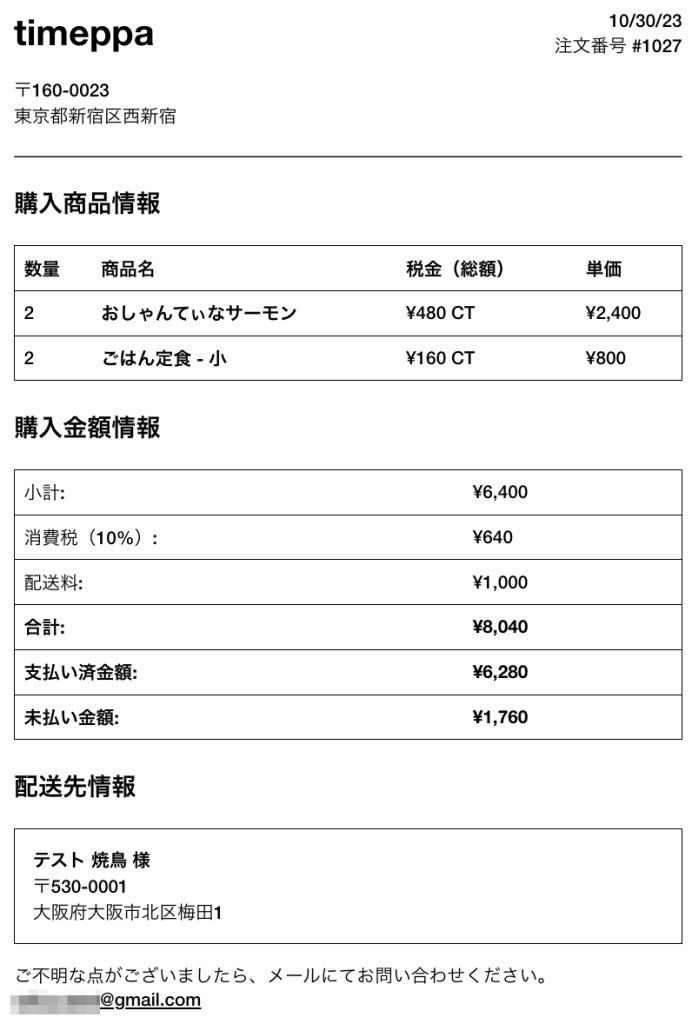
例1:初期登録のテンプレートを素直に日本語(日本形式)にしたバージョン
ほぼ素直に日本語化、住所は日本の配列に変更したコードです
<p style="float: right; text-align: right; margin: 0;">
  {{ "now" | date: "%m/%d/%y" }}<br />
  注文番号 {{ order_name }}
</p>

<div style="float: left; margin: 0 0 1.5em 0;" >
  <strong style="font-size: 2em;">{{ shop_name }}</strong><br /><br />
   〒{{ shop.zip | upcase }}<br/>
   {{ shop.province | replace: 'Aichi', '愛知県' | replace: 'Akita', '秋田県' | replace: 'Aomori', '青森県' | replace: 'Chiba', '千葉県' | replace: 'Ehime', '愛媛県' | replace: 'Fukui', '福井県' | replace: 'Fukuoka', '福岡県' | replace: 'Fukushima', '福島県' | replace: 'Gifu', '岐阜県' | replace: 'Gunma', '群馬県' | replace: 'Hiroshima', '広島県' | replace: 'Hokkaidō', '北海道' | replace: 'Hyōgo', '兵庫県' | replace: 'Ibaraki', '茨城県' | replace: 'Ishikawa', '石川県' | replace: 'Iwate', '岩手県' | replace: 'Kagawa', '香川県' | replace: 'Yamanashi', '山梨県' | replace: 'Yamaguchi', '山口県' | replace: 'Kōchi', '高知県' | replace: 'Kumamoto', '熊本県' | replace: 'Kyōto', '京都府' | replace: 'Mie', '三重県' | replace: 'Yamagata', '山形県' | replace: 'Miyazaki', '宮崎県' | replace: 'Nagano', '長野県' | replace: 'Nagasaki', '長崎県' | replace: 'Nara', '奈良県' | replace: 'Niigata', '新潟県' | replace: 'Ōita', '大分県' | replace: 'Okayama', '岡山県' | replace: 'Okinawa', '沖縄県' | replace: 'Ōsaka', '大阪府' | replace: 'Saga', '佐賀県' | replace: 'Saitama', '埼玉県' | replace: 'Shiga', '滋賀県' | replace: 'Shimane', '島根県' | replace: 'Shizuoka', '静岡県' | replace: 'Tochigi', '栃木県' | replace: 'Tokushima', '徳島県' | replace: 'Tottori', '鳥取県' | replace: 'Toyama', '富山県' | replace: 'Tōkyō', '東京都' | replace: 'Miyagi', '宮城県' | replace: 'Wakayama', '和歌山県' | replace: 'Kanagawa', '神奈川県' | replace: 'Kagoshima', '鹿児島県' }}{{ shop.city }}{{ shop.address }}
</div>

<hr />

<h3 style="margin: 0 0 1em 0;">購入商品情報</h3>

<table class="table-tabular" style="margin: 0 0 1.5em 0;">
  <thead>
    <tr>
      <th>数量</th>
      <th>商品名</th>
      {% if show_line_item_taxes %}
      <th>税金(総額)</th>
      {% endif %}
      <th>単価</th>
    </tr>
  </thead>
  <tbody>
    {% for line_item in line_items %}
      <tr>
        <td>{{ line_item.quantity }}</td>
        <td><b>{{ line_item.title }}</b></td>
        {% if show_line_item_taxes %}
        <td>
          {% for tax_line in line_item.tax_lines %}
            {{ tax_line.price | money }} {{ tax_line.title }}<br/>
          {% endfor %}
        </td>
        {% endif %}
        <td>
          {% if line_item.original_price != line_item.price %}
            <s>{{ line_item.original_price | money }}</s>
          {% endif %}
          {{ line_item.price | money }}
        </td>
      </tr>
    {% endfor %}
  </tbody>
</table>

{% if transactions.size > 1 %}
  <h3 style="margin: 0 0 1em 0;">決済情報</h3>
  <table class="table-tabular" style="margin: 0 0 1.5em 0;">
    <thead>
      <tr>
        <th>決済方法</th>
        <th>金額</th>
        <th>種類</th>
        <th>ステータス</th>
      </tr>
    </thead>
    <tbody>
      {% for transaction in transactions %}
        <tr>
          <td>{{ transaction.gateway | payment_method }}</td>
          <td>{{ transaction.amount | money }}</td>
          <td>{{ transaction.kind }}</td>
          <td>{{ transaction.status }}</td>
        </tr>
      {% endfor %}
    </tbody>
  </table>
{% endif %}

<h3 style="margin: 0 0 1em 0;">購入金額情報</h3>

<table class="table-tabular" style="margin: 0 0 1.5em 0;">
  <tr>
    <td>小計:</td>
    <td>{{ subtotal_price | money }}</td>
  </tr>
  {% for discount in discounts %}
  <tr>
    <td>内、割引:クーポンコード "{{ discount.code }}"</td>
    <td>{{ discount.savings | money }}</td>
  </tr>
  {% endfor %}
  <tr>
    <td>消費税(10%):</td>
    <td>{{ tax_price | money }}</td>
  </tr>
  {% if shipping_address %}
    <tr>
      <td>配送料:</td>
      <td>{{ shipping_price | money }}</td>
    </tr>
  {% endif %}
  <tr>
    <td><strong>合計:</strong></td>
    <td><strong>{{ total_price | money }}</strong></td>
  </tr>
  {% if total_paid != total_price %}
    <tr>
      <td><strong>支払い済金額:</strong></td>
      <td><strong>{{ total_paid | money }}</strong></td>
    </tr>
    <tr>
      <td><strong>未払い金額:</strong></td>
      <td><strong>{{ total_price | minus: total_paid | money }}</strong></td>
    </tr>
  {% endif %}
</table>

{% if note %}
  <h3 style="margin: 0 0 1em 0;">備考</h3>
  <p>{{ note }}</p>
{% endif %}

{% if shipping_address %}
  <h3 style="margin: 0 0 1em 0;">配送先情報</h3>

  <div style="margin: 0 0 1em 0; padding: 1em; border: 1px solid black;">
    <strong>{{ shipping_address.last_name }} {{ shipping_address.first_name }} 様</strong><br/>
    〒{{ shipping_address.zip }}<br />
    {{ shipping_address.province | replace: 'Aichi', '愛知県' | replace: 'Akita', '秋田県' | replace: 'Aomori', '青森県' | replace: 'Chiba', '千葉県' | replace: 'Ehime', '愛媛県' | replace: 'Fukui', '福井県' | replace: 'Fukuoka', '福岡県' | replace: 'Fukushima', '福島県' | replace: 'Gifu', '岐阜県' | replace: 'Gunma', '群馬県' | replace: 'Hiroshima', '広島県' | replace: 'Hokkaidō', '北海道' | replace: 'Hyōgo', '兵庫県' | replace: 'Ibaraki', '茨城県' | replace: 'Ishikawa', '石川県' | replace: 'Iwate', '岩手県' | replace: 'Kagawa', '香川県' | replace: 'Yamanashi', '山梨県' | replace: 'Yamaguchi', '山口県' | replace: 'Kōchi', '高知県' | replace: 'Kumamoto', '熊本県' | replace: 'Kyōto', '京都府' | replace: 'Mie', '三重県' | replace: 'Yamagata', '山形県' | replace: 'Miyazaki', '宮崎県' | replace: 'Nagano', '長野県' | replace: 'Nagasaki', '長崎県' | replace: 'Nara', '奈良県' | replace: 'Niigata', '新潟県' | replace: 'Ōita', '大分県' | replace: 'Okayama', '岡山県' | replace: 'Okinawa', '沖縄県' | replace: 'Ōsaka', '大阪府' | replace: 'Saga', '佐賀県' | replace: 'Saitama', '埼玉県' | replace: 'Shiga', '滋賀県' | replace: 'Shimane', '島根県' | replace: 'Shizuoka', '静岡県' | replace: 'Tochigi', '栃木県' | replace: 'Tokushima', '徳島県' | replace: 'Tottori', '鳥取県' | replace: 'Toyama', '富山県' | replace: 'Tōkyō', '東京都' | replace: 'Miyagi', '宮城県' | replace: 'Wakayama', '和歌山県' | replace: 'Kanagawa', '神奈川県' | replace: 'Kagoshima', '鹿児島県' }}{{ shipping_address.city }}{{ shipping_address.address1 }}{{ shipping_address.address2 }}<br />
    {% if shipping_address.company %}{{ shipping_address.company }}<br />{% endif %}
    {% if shipping_address.phone %}{{ shipping_address.phone }}{% endif %}
  </div>
{% endif %}

<p>ご不明な点がございましたら、メールにてお問い合わせください。<br /><u>{{ shop.email }}</u></p>
以下、プレビューです
例2:日本のECサイトによくある請求書フォーマットのバージョン
ここまで書いておいてなんですが、
初期に登録されているInvoice(請求書)は請求書と支払明細書(納品書)の混合のようなややこしい内容であると解釈しています
以下、お世話になっているマネーフォワードクラウドさんの引用です
まず、支払明細書と領収書の違いは「支払いがあったかどうか」です。
支払明細書ではまだ支払いがありません。あくまでも、取引内容と金額をお互いに確認するために発行する書類です。
支払明細書に対して領収書は、支払いがあったことを証明する書類です。領収書には商品名やサービス名が記載される場合がありますが、それらに対応する支払いがあったことを証明しています。次に、支払明細書と請求書の違いは「支払いの要求があるかどうか」です。
https://biz.moneyforward.com/accounting/basic/45861/
支払明細書は、請求書を発行する前の段階にお互いに取引内容を確認するための書類です。
したがって支払明細書では支払いを要求していません。
それに対して請求書は、期日や支払先の情報を記載し、支払いの要求を行う書類です。
なので、初期に登録している内容は請求先などの情報も入っていないためInvoiceというタイトルにはなっているものの支払明細書(納品書)に近いのではないかと思っています
上記を踏まえて次は「支払明細書(納品書)」ではなく「請求書」として使用できる請求書フォーマットに書き換えてみます
<style>
	table.table-original td {padding: 0.5em;}
	table.table-original th,table.table-original td {border: 1px solid #000;}
</style>
<p style="text-align: right; margin: 0;">
  {{ "now" | date: "%Y/%m/%d" }}<br>
  注文番号 {{ order_name }}
</p>
<h1 style="text-align: center;">請求書</h1>
<div>
	<p style="font-size: 140%;">{% if billing_address.company %}{{ billing_address.company }}<br>{% endif %}<strong>{{ billing_address.last_name }} {{ billing_address.first_name }} 様</strong></p>
</div>
<div style="display: flex; justify-content: space-between; margin-bottom: 2em;">
	<div style="width: 50%;">
		<table style="width: 100%; border: 2px solid #000;">
			<tbody>
				<tr style="border-bottom: 1px solid #000;">
					<th style="width: 40%;background-color: #ddd; padding: 10px 5px;  border-right: 1px solid #000;"><strong>請求金額</strong></th>
					<td style="width: 60%; padding: 10px 5px; font-size: 120%;"><strong>{{ total_price | money }}</strong></td>
				</tr>
				<tr>
					<th style="width: 40%;background-color: #ddd; padding: 10px 5px;  border-right: 1px solid #000;"><strong>振込期限</strong></th>
					<td style="width: 60%; padding: 10px 5px; ">
						{% assign seconds = 30 | times: 24 | times: 60 | times: 60 %}
						{{ "now" | date: "%s" | plus: seconds | date: "%Y/%m/%d" }}
					</td>
				</tr>
			</tbody>
		</table>
	</div>
	<div style="width: 20%;">
		<p style="background-color: #ddd; line-height: 3em; text-align: center; margin: 0; border-top: 1px solid #000; border-bottom: 1px solid #000;"><strong>お振込み先</strong></p>
		<p style="padding: 0;">〇〇銀行 〇〇支店<br>普通 12345678</p>
	</div>
</div>
<table  class="table-original" style="width: 100%; padding-bottom: 3em;">
	<thead style="border-bottom: 1px solid #000;">
		<tr><th>商品名</th><th>単価</th><th>数量</th><th>金額</th></tr>
	</thead>
	<tbody>
		{% for line_item in line_items %}
		<tr style="border-bottom: 1px solid #888;">
			<td>{{ line_item.title }}</td>
			<td style="text-align: right;">
				{% if line_item.original_price != line_item.price %}
					<s>{{ line_item.original_price | money }}</s>
				{% endif %}
				{{ line_item.price | money }}
			</td>
			<td style="text-align: right;">{{ line_item.quantity }}</td>
			<td style="text-align: right;">
				{% assign product_total_price = line_item.price | times:line_item.quantity %}
				{{ product_total_price | money }}
			</td>
		</tr>
		{% endfor %}
		<tr style="border-top: 3px double #888;">
			<td colspan="3" style="text-align: right;">小計</td>
			<td style="text-align: right;">{{ subtotal_price | money }}</td>
		</tr>
		{% for discount in discounts %}
		<tr>
			<td colspan="3" style="text-align: right;">割引(クーポンコード: {{ discount.code }})</td>
			<td style="text-align: right;">{{ discount.savings | money }}</td>
		</tr>
		{% endfor %}
		<tr>
			<td colspan="3" style="text-align: right;">消費税(10%)</td>
			<td style="text-align: right;">{{ tax_price | money }}</td>
		</tr>
		<tr>
			<td colspan="3" style="text-align: right;">配送料</td>
			<td style="text-align: right;">{{ shipping_price | money }}</td>
		</tr>
		<tr>
			<td colspan="3" style="text-align: right;">合計(税込)</td>
			<td style="text-align: right; font-size: 1.5em; font-weight: bold;">{{ total_price | money }}</td>
		</tr>
	</tbody>
</table>
{% if note %}
<div>
	<p>
		<strong>備考</strong><br>
		{% if note %}{{ note }}{% endif %}
	</p>
</div>
{% endif %}
<div style="display: flex; flex-direction: row-reverse;">
	<p style="width: 30%;"><strong>{{ shop_name }}</strong><br>
	<small>〒{{ shop.zip | upcase }}<br/>
		   {{ shop.province | replace: 'Aichi', '愛知県' | replace: 'Akita', '秋田県' | replace: 'Aomori', '青森県' | replace: 'Chiba', '千葉県' | replace: 'Ehime', '愛媛県' | replace: 'Fukui', '福井県' | replace: 'Fukuoka', '福岡県' | replace: 'Fukushima', '福島県' | replace: 'Gifu', '岐阜県' | replace: 'Gunma', '群馬県' | replace: 'Hiroshima', '広島県' | replace: 'Hokkaidō', '北海道' | replace: 'Hyōgo', '兵庫県' | replace: 'Ibaraki', '茨城県' | replace: 'Ishikawa', '石川県' | replace: 'Iwate', '岩手県' | replace: 'Kagawa', '香川県' | replace: 'Yamanashi', '山梨県' | replace: 'Yamaguchi', '山口県' | replace: 'Kōchi', '高知県' | replace: 'Kumamoto', '熊本県' | replace: 'Kyōto', '京都府' | replace: 'Mie', '三重県' | replace: 'Yamagata', '山形県' | replace: 'Miyazaki', '宮崎県' | replace: 'Nagano', '長野県' | replace: 'Nagasaki', '長崎県' | replace: 'Nara', '奈良県' | replace: 'Niigata', '新潟県' | replace: 'Ōita', '大分県' | replace: 'Okayama', '岡山県' | replace: 'Okinawa', '沖縄県' | replace: 'Ōsaka', '大阪府' | replace: 'Saga', '佐賀県' | replace: 'Saitama', '埼玉県' | replace: 'Shiga', '滋賀県' | replace: 'Shimane', '島根県' | replace: 'Shizuoka', '静岡県' | replace: 'Tochigi', '栃木県' | replace: 'Tokushima', '徳島県' | replace: 'Tottori', '鳥取県' | replace: 'Toyama', '富山県' | replace: 'Tōkyō', '東京都' | replace: 'Miyagi', '宮城県' | replace: 'Wakayama', '和歌山県' | replace: 'Kanagawa', '神奈川県' | replace: 'Kagoshima', '鹿児島県' }}{{ shop.city }}{{ shop.address }}</small></p>
</div>
以下、プレビューです
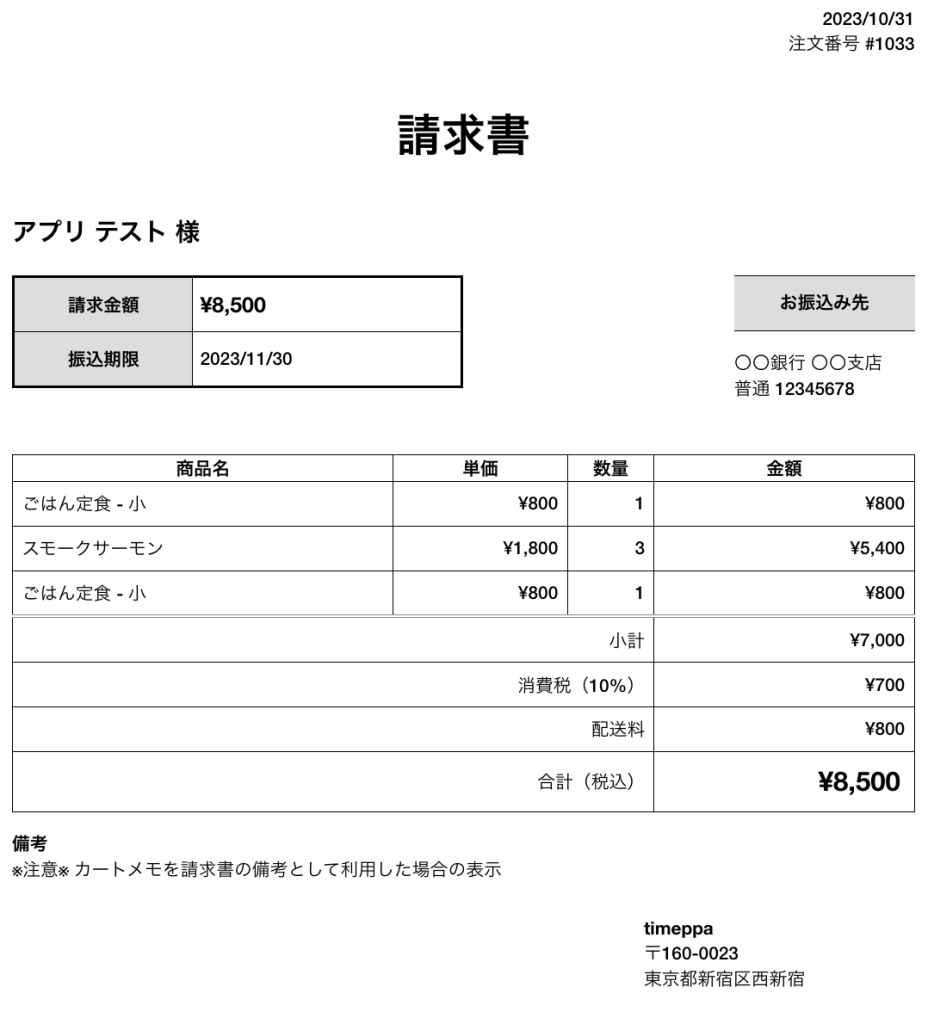
ポイントとしては購入の際に会社名を入力の場合は宛先に出すようにしています
また、振込期限を印刷日から30日後としています
初期にはない1商品あたりの合計金額の列を出すようにしています
クーポンコードで割引を行った場合はその旨を小計の下に出すようにしています
参考にした記事は以下です
【Shopify】Liquid 上で「現在の日付から◯日後」を表現する方法
Order Printerの商品価格の合計を出したい
プラスアルファ:請求書に追加したい項目のコード
プラスアルファで追加できるコードをアプリがまとめてくれています
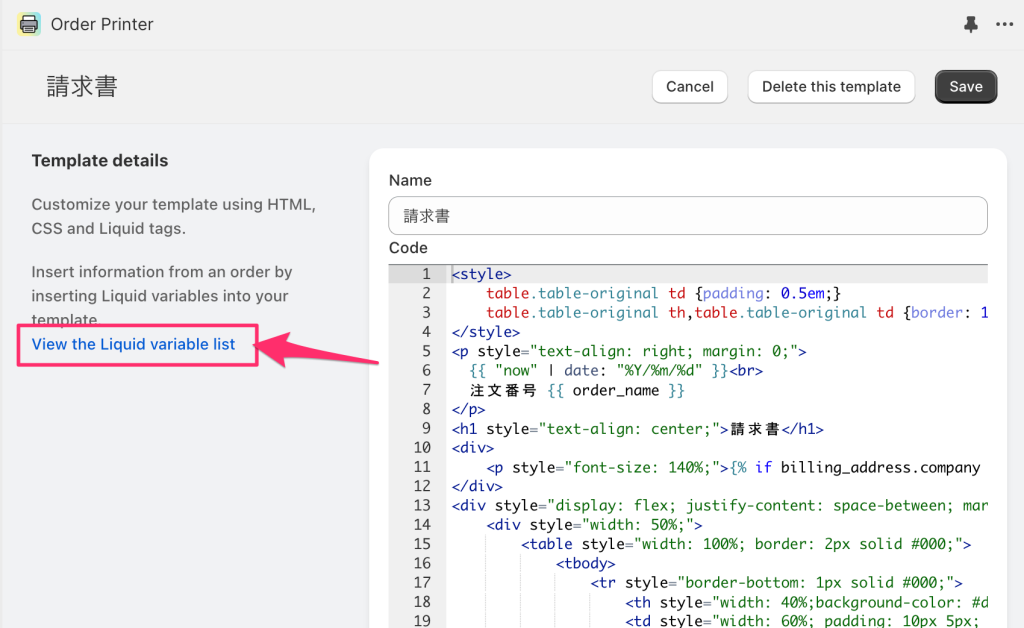
以下、要素として使いそうなものです
- 店舗の電話番号({{ shop.phone }})
- 店舗のメールアドレス({{ shop.email }})
- 購入商品のバリエーション名({{ line_item.variant }})
- 購入商品のSKU({{ line_item.sku }})
これらを入れ込んだものを最終形としてまとめたのが次の例です
ついでにインボイスの登録番号も入れ込んでみます(軽減税率がない場合を仮定したもの)
【コピペOK!】【最終形】「Order Printer」請求書の例
<style>
	table.table-original td {padding: 0.5em;}
	table.table-original th,table.table-original td {border: 1px solid #000;}
</style>
<p style="text-align: right; margin: 0;">
  {{ "now" | date: "%Y/%m/%d" }}<br>
  注文番号 {{ order_name }}
</p>
<h1 style="text-align: center;">請求書</h1>
<div>
	<p style="font-size: 140%;">{% if billing_address.company %}{{ billing_address.company }}<br>{% endif %}<strong>{{ billing_address.last_name }} {{ billing_address.first_name }} 様</strong></p>
</div>
<div style="display: flex; justify-content: space-between; margin-bottom: 2em;">
	<div style="width: 50%;">
		<table style="width: 100%; border: 2px solid #000;">
			<tbody>
				<tr style="border-bottom: 1px solid #000;">
					<th style="width: 40%;background-color: #ddd; padding: 10px 5px;  border-right: 1px solid #000;"><strong>請求金額</strong></th>
					<td style="width: 60%; padding: 10px 5px; font-size: 120%;"><strong>{{ total_price | money }}</strong></td>
				</tr>
				<tr>
					<th style="width: 40%;background-color: #ddd; padding: 10px 5px;  border-right: 1px solid #000;"><strong>振込期限</strong></th>
					<td style="width: 60%; padding: 10px 5px; ">
						{% assign seconds = 30 | times: 24 | times: 60 | times: 60 %}
						{{ "now" | date: "%s" | plus: seconds | date: "%Y/%m/%d" }}
					</td>
				</tr>
			</tbody>
		</table>
	</div>
	<div style="width: 20%;">
		<p style="background-color: #ddd; line-height: 3em; text-align: center; margin: 0; border-top: 1px solid #000; border-bottom: 1px solid #000;"><strong>お振込み先</strong></p>
		<p style="padding: 0;">〇〇銀行 〇〇支店<br>普通 12345678</p>
	</div>
</div>
<table  class="table-original" style="width: 100%; padding-bottom: 3em;">
	<thead style="border-bottom: 1px solid #000;">
		<tr><th>商品名</th><th>単価</th><th>数量</th><th>金額</th></tr>
	</thead>
	<tbody>
		{% for line_item in line_items %}
		<tr style="border-bottom: 1px solid #888;">
			<td>{{ line_item.title }} (SKU: {{ line_item.sku }})</td>
			<td style="text-align: right;">
				{% if line_item.original_price != line_item.price %}
					<s>{{ line_item.original_price | money }}</s>
				{% endif %}
				{{ line_item.price | money }}
			</td>
			<td style="text-align: right;">{{ line_item.quantity }}</td>
			<td style="text-align: right;">
				{% assign product_total_price = line_item.price | times:line_item.quantity %}
				{{ product_total_price | money }}
			</td>
		</tr>
		{% endfor %}
		<tr style="border-top: 3px double #888;">
			<td colspan="3" style="text-align: right;">小計</td>
			<td style="text-align: right;">{{ subtotal_price | money }}</td>
		</tr>
		{% for discount in discounts %}
		<tr>
			<td colspan="3" style="text-align: right;">割引(クーポンコード: {{ discount.code }})</td>
			<td style="text-align: right;">{{ discount.savings | money }}</td>
		</tr>
		{% endfor %}
		<tr>
			<td colspan="3" style="text-align: right;">消費税(10%)</td>
			<td style="text-align: right;">{{ tax_price | money }}</td>
		</tr>
		<tr>
			<td colspan="3" style="text-align: right;">配送料</td>
			<td style="text-align: right;">{{ shipping_price | money }}</td>
		</tr>
		<tr>
			<td colspan="3" style="text-align: right;">合計(税込)</td>
			<td style="text-align: right; font-size: 1.5em; font-weight: bold;">{{ total_price | money }}</td>
		</tr>
	</tbody>
</table>
<h2 style="font-size: 1.2em;">【消費税区分】</h2>
<table class="table-original" style="width: 50%; padding-bottom: 3em;">
	<tbody>
		<tr>
			<td style="text-align: right;">10%対象</td>
			<td style="text-align: right;">{{ total_price | money }}(消費税:{{ tax_price | money }})</td>
		</tr>
	</tbody>
</table>
{% if note %}
<div>
	<p>
		<strong>備考</strong><br>
		{% if note %}{{ note }}{% endif %}
	</p>
</div>
{% endif %}
<div style="display: flex; flex-direction: row-reverse;">
	<p style="width: 30%;"><strong>{{ shop_name }}<br>(登録番号:T1234567890123)</strong><br>
	<small>〒{{ shop.zip | upcase }}<br/>
		   {{ shop.province | replace: 'Aichi', '愛知県' | replace: 'Akita', '秋田県' | replace: 'Aomori', '青森県' | replace: 'Chiba', '千葉県' | replace: 'Ehime', '愛媛県' | replace: 'Fukui', '福井県' | replace: 'Fukuoka', '福岡県' | replace: 'Fukushima', '福島県' | replace: 'Gifu', '岐阜県' | replace: 'Gunma', '群馬県' | replace: 'Hiroshima', '広島県' | replace: 'Hokkaidō', '北海道' | replace: 'Hyōgo', '兵庫県' | replace: 'Ibaraki', '茨城県' | replace: 'Ishikawa', '石川県' | replace: 'Iwate', '岩手県' | replace: 'Kagawa', '香川県' | replace: 'Yamanashi', '山梨県' | replace: 'Yamaguchi', '山口県' | replace: 'Kōchi', '高知県' | replace: 'Kumamoto', '熊本県' | replace: 'Kyōto', '京都府' | replace: 'Mie', '三重県' | replace: 'Yamagata', '山形県' | replace: 'Miyazaki', '宮崎県' | replace: 'Nagano', '長野県' | replace: 'Nagasaki', '長崎県' | replace: 'Nara', '奈良県' | replace: 'Niigata', '新潟県' | replace: 'Ōita', '大分県' | replace: 'Okayama', '岡山県' | replace: 'Okinawa', '沖縄県' | replace: 'Ōsaka', '大阪府' | replace: 'Saga', '佐賀県' | replace: 'Saitama', '埼玉県' | replace: 'Shiga', '滋賀県' | replace: 'Shimane', '島根県' | replace: 'Shizuoka', '静岡県' | replace: 'Tochigi', '栃木県' | replace: 'Tokushima', '徳島県' | replace: 'Tottori', '鳥取県' | replace: 'Toyama', '富山県' | replace: 'Tōkyō', '東京都' | replace: 'Miyagi', '宮城県' | replace: 'Wakayama', '和歌山県' | replace: 'Kanagawa', '神奈川県' | replace: 'Kagoshima', '鹿児島県' }}{{ shop.city }}{{ shop.address }}<br>
	   {{ shop.phone }}(営業時間:平日10:00-17:00)<br>{{ shop.email }}</small></p>
</div>
以下、プレビューです
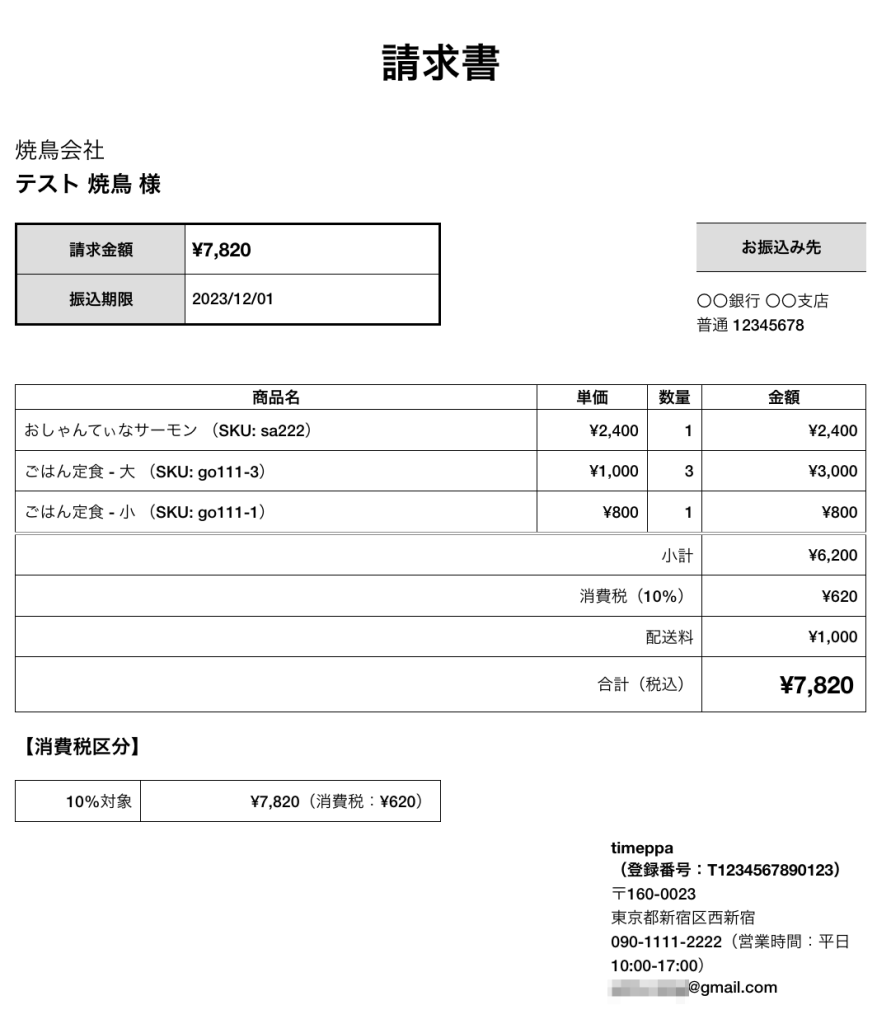
インボイスのフォーマット参考は下記の記事で行いました
軽減税率の適用対象となる商品がない場合(適格請求書保存方式)
外伝:インボイスに対応した領収書のテンプレート例
最後に、領収書フォーマットの例です
<style>
	table.table-original td {padding: 0.5em;}
	table.table-original th,table.table-original td {border: 1px solid #000;}
</style>
<h1 style="text-align: center;">領収書</h1>
<div style="display: flex; justify-content: space-between; align-items: flex-end; margin-bottom: 2em;">
	<div style="width: 50%;">
		<p style="font-size: 140%; 	border-bottom: 1px solid #000; margin: 0;">{% if billing_address.company %}{{ billing_address.company }}<br>{% endif %}<strong>{{ billing_address.last_name }} {{ billing_address.first_name }} 様</strong></p>
	</div>
	<div style="width: 20%;">
		<p style="text-align: right; margin: 0;">
			発行日:{{ "now" | date: "%Y/%m/%d" }}<br>
			No.{{ "now" | date: "%Y%m%d" }}-{{ order_name }}
		</p>
	</div>
</div>
<div style="width: 60%; margin: 0 auto;">
	<p style="font-size: 250%; text-align: center; border-bottom: 1px solid #000; line-height: 1.7; margin-bottom: 10px;"><strong>{{ total_price | money }}</strong></p>
	<p>但し、お品代として<br>上記正に領収いたしました。</p>
</div>
<div style="display: flex; margin-bottom: 2em;">
	<div style="width: 40%; margin-right: 2em;">
		<h2 style="font-size: 120%; border-bottom: double 3px #000">内訳</h2>
		<table style="width: 100%;">
			<tbody>
				<tr>
					<td rowspan="2" style="font-size: 120%;"><strong>税率<br>10%</strong></td>
					<td>税抜き金額</td>
					<td>
						{% assign mainustax_total_price = total_price | minus:tax_price %}
						{{ mainustax_total_price | money }}
					</td>
				</tr>
				<tr>
					<td>消費税額</td>
					<td>{{ tax_price | money }}</td>
				</tr>
			</tbody>
		</table>
	</div>
	<div style="width: 40%;">
		<p><strong>{{ shop_name }}<br>(登録番号:T1234567890123)</strong><br>
		<small>〒{{ shop.zip | upcase }}<br/>
			   {{ shop.province | replace: 'Aichi', '愛知県' | replace: 'Akita', '秋田県' | replace: 'Aomori', '青森県' | replace: 'Chiba', '千葉県' | replace: 'Ehime', '愛媛県' | replace: 'Fukui', '福井県' | replace: 'Fukuoka', '福岡県' | replace: 'Fukushima', '福島県' | replace: 'Gifu', '岐阜県' | replace: 'Gunma', '群馬県' | replace: 'Hiroshima', '広島県' | replace: 'Hokkaidō', '北海道' | replace: 'Hyōgo', '兵庫県' | replace: 'Ibaraki', '茨城県' | replace: 'Ishikawa', '石川県' | replace: 'Iwate', '岩手県' | replace: 'Kagawa', '香川県' | replace: 'Yamanashi', '山梨県' | replace: 'Yamaguchi', '山口県' | replace: 'Kōchi', '高知県' | replace: 'Kumamoto', '熊本県' | replace: 'Kyōto', '京都府' | replace: 'Mie', '三重県' | replace: 'Yamagata', '山形県' | replace: 'Miyazaki', '宮崎県' | replace: 'Nagano', '長野県' | replace: 'Nagasaki', '長崎県' | replace: 'Nara', '奈良県' | replace: 'Niigata', '新潟県' | replace: 'Ōita', '大分県' | replace: 'Okayama', '岡山県' | replace: 'Okinawa', '沖縄県' | replace: 'Ōsaka', '大阪府' | replace: 'Saga', '佐賀県' | replace: 'Saitama', '埼玉県' | replace: 'Shiga', '滋賀県' | replace: 'Shimane', '島根県' | replace: 'Shizuoka', '静岡県' | replace: 'Tochigi', '栃木県' | replace: 'Tokushima', '徳島県' | replace: 'Tottori', '鳥取県' | replace: 'Toyama', '富山県' | replace: 'Tōkyō', '東京都' | replace: 'Miyagi', '宮城県' | replace: 'Wakayama', '和歌山県' | replace: 'Kanagawa', '神奈川県' | replace: 'Kagoshima', '鹿児島県' }}{{ shop.city }}{{ shop.address }}<br>
		   {{ shop.phone }}(営業時間:平日10:00-17:00)<br>{{ shop.email }}</small></p>
	</div>
</div>
以下、プレビューです
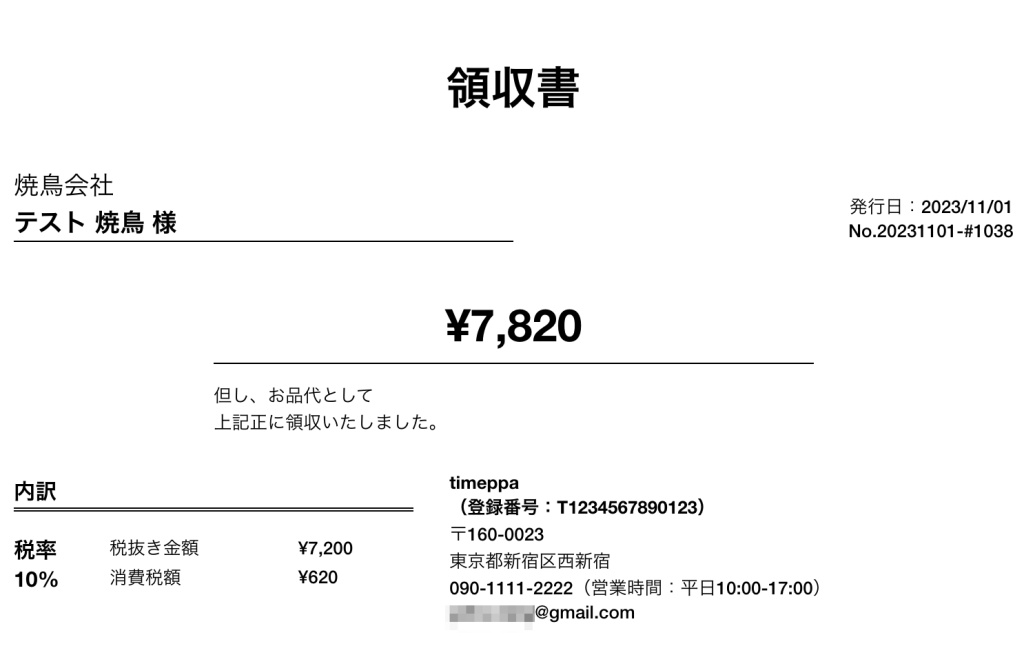
税抜き金額には送料も含んでいます
使用する際には実際に印刷時に崩れないか確認してください